





















FAQ GeoDAS How to Retrieve Logfiles
1. Introduction
- This procedure describes how to retrieve logfiles from GeoDAS software.
2. Required Tools
- GeoDAS installed on a Windows computer
3. Retrieve Logfiles
- Logfiles are stored in GeoDAS data folder under LogFiles (e.g. C:\GeoDAS_DATA\LogFiles>)
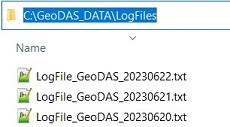
- There is a .txt file for every day GeoDAS was running.
- Prefix is LogFiles_GeoDAS_ followed by a date stamp in format YYYYMMDD
- The .txt files can be viewed in any text editor; time stamps correspond to PC time.
- Large files can be zipped to save space.